
If you manage a website, you have probably stared at the Google Search Console "Pages" report and wondered what "Crawled — currently not indexed" actually means. I get asked about this status more than any other. It is vague. Google gives you the label but offers almost no explanation of what is wrong or how to fix it. The message feels like a polite rejection letter with no return address.
After spending five months working through the AJSA SEO certification exams from level 4 up to level 1 — and failing one attempt along the way, which I wrote about in my AJSA SEO certification experience post — I have spent a lot of time with Google's documentation and real-world cases. Here is what "Crawled — currently not indexed" actually means, why it happens, and what you can do about it.
What "Crawled — Currently Not Indexed" Actually Means
According to Google's Search Console Help Center, this status means Googlebot has successfully fetched and processed the page, but the page has not been added to Google's index. Google crawls far more pages than it can include in search results. It selects pages based on perceived usefulness, quality, uniqueness, and relevance. When a page falls into this status, Google has evaluated it and decided it does not currently meet the criteria for inclusion.
This is fundamentally different from "Discovered — currently not indexed". As Google's documentation explains, "Discovered" means Google knows the URL exists — perhaps from your sitemap or an internal link — but has not yet crawled it. The page is sitting in a queue. "Crawled," on the other hand, means Googlebot has already visited, read the file, and made an active decision not to index it. One is a scheduling issue. The other is a quality judgment.
Understanding this distinction matters because the fixes are completely different. If your page is "Discovered," you are usually dealing with crawl budget, site speed, or internal linking problems. If it is "Crawled," the problem is almost certainly the page itself.
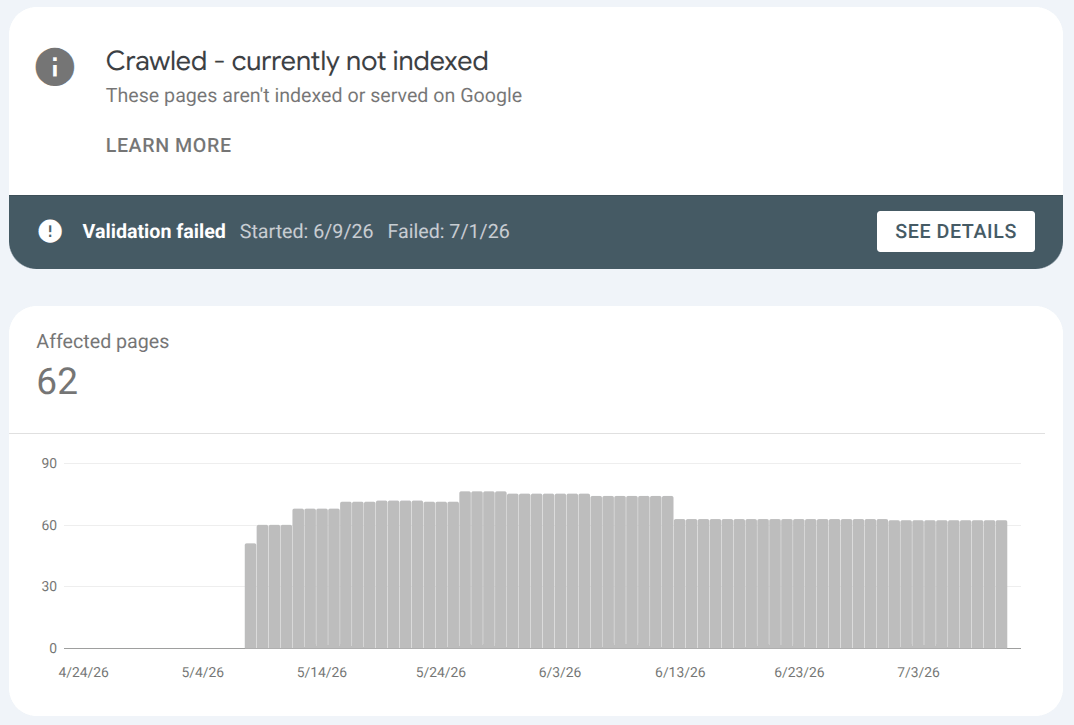
The image above illustrates the number of unindexed pages at an actual client site.
Why Google Reads a Page and Still Refuses to Index It
Google does not publish a checklist for this status, but after reviewing hundreds of cases and cross-referencing Google's public guidance, the reasons fall into four categories.
1. The Content Does Not Meet the Quality Bar
This is the most common reason. Google's Search Quality Rater Guidelines describe how human evaluators assess page quality using the E-E-A-T framework: Experience, Expertise, Authoritativeness, and Trustworthiness. Google announced the addition of "Experience" to the previous E-A-T framework in a December 2022 blog post, emphasizing that content demonstrating first-hand experience should be valued more highly.
When a page is thin — offering little original information, outdated facts, or shallow coverage of a topic — it fails this evaluation. The same applies to keyword stuffing. Google's guidance on creating helpful, people-first content is explicit: write for your actual visitors first. If a person coming to the page would not feel satisfied, Google is unlikely to index it. Content created primarily to rank, rather than to help people, is exactly what Google's core updates target.
In my own work, the pages that stay stuck in "Crawled" longest are almost always the ones that were generated quickly without real subject-matter depth. The fix is not to add more keywords. It is to add more value.
2. Duplicate or Near-Duplicate Content
If your page looks too similar to another page — whether on your own site or elsewhere on the web — Google may choose not to index it. Google's systems are designed to select one canonical version when duplicates exist. As Google's documentation on consolidating duplicate URLs explains, the rel="canonical" tag is a strong hint you can place in the <head> of duplicate pages to point Google toward the preferred version. Other signals include 301 redirects, consistent internal linking, and including only canonical versions in your sitemap.
The problem often appears on e-commerce sites with thousands of near-identical product pages, or on blogs where tag archives and category pages reproduce the same content. If Google sees ten pages that say essentially the same thing, it may index one and leave the rest in "Crawled."
3. Mobile and Page Experience Problems
Mobile usability used to have its own dedicated report in Search Console, but Google sunset the Mobile Usability report and the standalone Mobile-Friendly Test in December 2023. The focus has shifted to broader Page Experience signals and Core Web Vitals — loading performance (LCP), interactivity (INP), and visual stability (CLS). These metrics are now the standard for evaluating whether a page delivers a usable experience, especially on mobile devices.
If a page loads slowly, has intrusive interstitials, or renders poorly on a phone, Google may crawl it, evaluate the experience, and decide the page is not worth indexing. The underlying logic is simple: Google does not want to send searchers to pages that frustrate them. You can check your site's Core Web Vitals in Search Console's dedicated report or via PageSpeed Insights. For how we think about ranking fundamentals at Kafkai, see our guide to search visibility strategies.
4. Policy or Legal Violations
In some cases, the page violates Google's spam policies or legal guidelines. This includes copyright infringement, deceptive practices, spammy behavior, or content that violates regulations in sensitive industries such as pharmaceuticals and medical advertising. These cases are less common for typical business websites but worth knowing about. If you suspect a policy issue, review Google's spam policies documentation directly.
A Practical Fix Checklist
If you have pages stuck in "Crawled — currently not indexed," here is the order in which I address them.
Step 1: Audit Content Quality with E-E-A-T in Mind
Start by asking whether the page genuinely helps someone. Is the information accurate? Is it current? Does it reflect first-hand experience or deep expertise? If you are writing about a topic you do not actually understand, that gap shows up in the language and structure.
Google's raters look for clear authorship, relevant credentials, citations to reputable sources, and transparency about who created the content. Add author bios, link to primary sources, and update statistics regularly. For content planning that targets the right depth and vocabulary, our keyword planner tips for content marketing outline how to build topical coverage rather than chasing single keywords.
For pages that are simply too thin, you have two options: improve them substantially or remove them. Consolidating weak pages into stronger ones often yields better results than leaving dozens of "Crawled" entries in your report.
Step 2: Eliminate Duplicates and Canonicalize Properly
Run a duplicate content audit. If you find near-identical pages, either merge them or use rel="canonical" to tell Google which version to prefer. Make sure your internal links point consistently to the canonical URLs, and keep your XML sitemap clean. If you are using AI-generated content, be aware that duplicate or boilerplate text is a common trap. I wrote about how to handle that in AI-generated content clarity and SEO.
Step 3: Update Information and Match Search Intent
Old data and outdated references signal to Google that the page is not being maintained. Replace stale statistics with current ones. Then re-examine the search intent: what is a person actually looking for when they type the keyword that should lead to this page? If your page answers a different question than the one searchers are asking, Google has no reason to index it.
Step 4: Fix Mobile Experience and Core Web Vitals
Use PageSpeed Insights and Lighthouse to identify performance bottlenecks. Pay attention to mobile-specific issues: tap target spacing, readable font sizes, responsive layout breaks, and viewport configuration. In Search Console, monitor the Core Web Vitals report for URL-level data. Slow server response times and unstable layouts are fixable technical issues that can tip a borderline page from "Crawled" into the index.
Step 5: Request Re-Indexing
Once you have improved the page, use the URL Inspection tool in Search Console to request indexing. This does not guarantee inclusion — quality assessments still apply — but it queues the page for a fresh crawl and evaluation. Track the results over weeks, not days. Google's indexing decisions are not instant, and improvements to site-wide authority often take time to register.
Before you request indexing, rule out a technical block. Kafkai's free Index Checker fetches the page the way a crawler does and reports the HTTP status and redirect chain, the robots.txt rules, the meta and header robots tags, the canonical, hreflang and whether the page is listed in your sitemap. If any of these is blocking the page, no amount of content work will get it indexed. The check needs no account. If you have a Kafkai account and have verified the domain, the checker also shows Google's own verdict from the Search Console URL Inspection API.
A ChatGPT Prompt to Diagnose Your Own Pages
Here is something practical you can use right now. If you have a page stuck in "Crawled — currently not indexed," paste the prompt below into ChatGPT (use a model with browsing enabled, such as GPT-4o), replace the URL placeholder with your actual page, and let it run the analysis. The prompt asks the AI to visit the page and estimate the probability of each reason from this article, with a short explanation for each score.
You are a senior SEO consultant with 15+ years of experience. I need you to diagnose why a specific page on my website is showing as "Crawled — currently not indexed" in Google Search Console.

First, browse and analyze this URL thoroughly: [PASTE YOUR URL HERE]

Then, evaluate the page against the four main reasons a page gets crawled but not indexed, and estimate the probability (as a percentage) that each reason applies to this specific page. For each percentage, briefly explain why you assigned that score based on what you see on the page.

1. Content does not meet the quality bar (thin content, outdated information, keyword stuffing, low E-E-A-T signals). Probability: ___%. Why:
2. Duplicate or near-duplicate content (internally or externally, including canonical tag issues). Probability: ___%. Why:
3. Mobile and Page Experience problems (poor Core Web Vitals, slow loading, intrusive interstitials, layout issues on mobile). Probability: ___%. Why:
4. Policy or legal violations (spam, copyright, deceptive practices, regulated industry issues). Probability: ___%. Why:

Finally, give me a prioritized list of the top 3 specific actions I should take on this page to maximize its chance of being indexed, with exact recommendations (e.g., add X words of original content, fix specific technical issue, merge with another page, etc.).
Why this works: The prompt forces a structured, percentage-based assessment rather than vague advice. By asking for probabilities with justifications, you get a focused diagnosis you can act on immediately. The browsing capability lets the AI see the actual page content, structure, and technical signals — not just guess from a description.
For example, when I try to use this prompt with an article on kafkai.ai which was crawled but not indexed, this is what I get:
## Diagnosis

**1. Content quality bar — Probability: 85%**

This is almost certainly the main cause.
- Sept 2023 generic, AI-flavored article on "Pinterest affiliate marketing" — an extremely saturated keyword — with zero original data, screenshots, real earnings examples, or firsthand experience.
- Outdated: "Story Pins" were renamed to "Idea Pins" in 2021, and affiliate-link handling on Idea Pins changed, so the advice is now factually wrong.
- Weak E-E-A-T: author "Geraldo" has no visible credentials; meta-description is just "A Comprehensive Guide." Post-HCU, this "search-intent-only, experience-zero" template is the textbook crawled-not-indexed profile.

**2. Duplicate / near-duplicate — Probability: 60%**

- Canonical is correctly self-referencing, so no tag problem.
- But the title and structure (definition → getting started → FAQ → conclusion) match thousands of near-identical articles on the web. Google likely reads this as an external near-duplicate that adds nothing new — the "no incremental value" side of the problem, not internal duplication.

**3. Mobile / Page Experience — Probability: 10%**

- Lightweight Wagtail static build, responsive image renditions (fill-1200x630 etc.), no interstitials. Very unlikely to be the driver of non-indexing.

**4. Policy / legal — Probability: 15%**

- No clear violation, but the three self-promotional affiliate-style links to kafkai.com combined with a "make money" YMYL-adjacent topic is a mild low-trust signal that lowers the quality score. Not enough to block indexing on its own.

## Top 3 prioritized actions

1. **Merge or delete (recommend 410 delete).** kafkai.ai's current positioning (2026 articles are strategy pieces — "Intelligent Platform," "Brand Trust") clashes with this 2023 "Pinterest side-hustle" post. It's brand-mismatched dead weight dragging down sitewide quality. Audit it alongside the other same-era articles and 410 anything not worth saving — highest ROI move.

2. **If keeping, full rewrite (+2,000–3,000 words original).** Update to current Idea Pins mechanics, add real analytics screenshots, concrete earnings data / case studies, and give the author a credentialed profile. Rewrite the meta-description from "A Comprehensive Guide" to a unique 120–155 char intent-matching description.

3. **Inject internal links.** Right now nothing meaningful links to this page except the related-articles widget (2026 posts are off-topic). If you keep it, add 3–5 contextual in-body links from related Marketing articles to restore crawl priority and internal importance signals.

Honest take: option 1 (delete/merge) is the real answer. Given the direction of your kafkaicomjp work, these 2023 legacy posts are cleanup targets rather than indexing-recovery candidates.
The Bigger Picture
"Crawled — currently not indexed" is not a bug. It is a signal. Google is telling you that the page was evaluated and found lacking in value, uniqueness, or experience relative to what already exists in the index. The shortest path out of this status is not technical trickery. It is making the page genuinely better than the alternatives.
This principle applies whether you are working on traditional SEO or newer disciplines like GEO and LLMO. As I covered in our LLMO support guide, AI search engines reference the same quality signals that Google uses. Improving your content for human readers improves it for every search system.
If you take one thing from this article, let it be this: when Google crawls a page and chooses not to index it, the problem is almost always on the page, not in the algorithm. Fix the page.
FAQs
How long does it take for a "Crawled" page to get indexed after improvements?
There is no fixed timeline. Google re-evaluates pages continuously, but site-wide quality signals can take weeks or months to shift. Request indexing via the URL Inspection tool after significant updates, then monitor the report.
Is "Crawled — currently not indexed" a penalty?
No. It is an algorithmic assessment, not a manual action or spam penalty. The page can be indexed in the future if the content or site improves sufficiently.
Can I force Google to index a page?
Not really. The URL Inspection tool's "Request indexing" feature queues a page for re-crawl, but the final indexing decision depends on Google's quality evaluation. There is no submission form that overrides that.
Does this status affect my entire site?
Not directly. It is assessed per page. However, if a large percentage of your pages are "Crawled" rather than indexed, it can indicate broader site-wide quality or authority issues that Google considers when evaluating new pages.