Rendered HTML
", "status": "draft" } ``` `status` is `draft` or `live`. A publish call also carries `language`, `slug`, `categories`, the Markdown as the agent wrote it, and the article details, when the agent supplies them. An endpoint can ignore every field it does not use. The full list of fields is in [Webhook request and response](https://kafkai.com/en/docs/tools/#webhook-request-and-response) in the tool reference. ### What the endpoint answers A JSON body with the ID of the post it created: ```json { "id": "123", "url": "https://example.com/blog/how-to-build-an-ai-strategy" } ``` - `id` (or `external_id`) — **required**. The ID of the post you created. Kafkai returns it to your agent as `external_id`, and uses it to update that same post later. - `url` — optional. The public or preview URL of the post. Kafkai returns it to your agent as `external_url`. Without it, Kafkai returns the webhook URL instead. Kafkai accepts the HTTP status codes `200`, `201` and `202`. Any other status code fails the call. Kafkai then shows your agent the `error` or `message` field of a JSON error body, or the status code when the body is not JSON. A success code with an HTML body, a non-JSON body, or no ID also fails the call. ### Updates are the same request An update is the same `POST` to the same URL, with `external_id` in the body. The endpoint decides between create and update from it: with `external_id`, change that post; without it, create a new one. ## 1. Open the publishing destinations in Kafkai In your Kafkai account, choose **Account**. In the **Connections** section, choose **Manage destinations** on the **Publishing destinations** row. You can also open the [Publishing Destinations page](https://kafkai.com/en/accounts/publishing-destinations/) directly.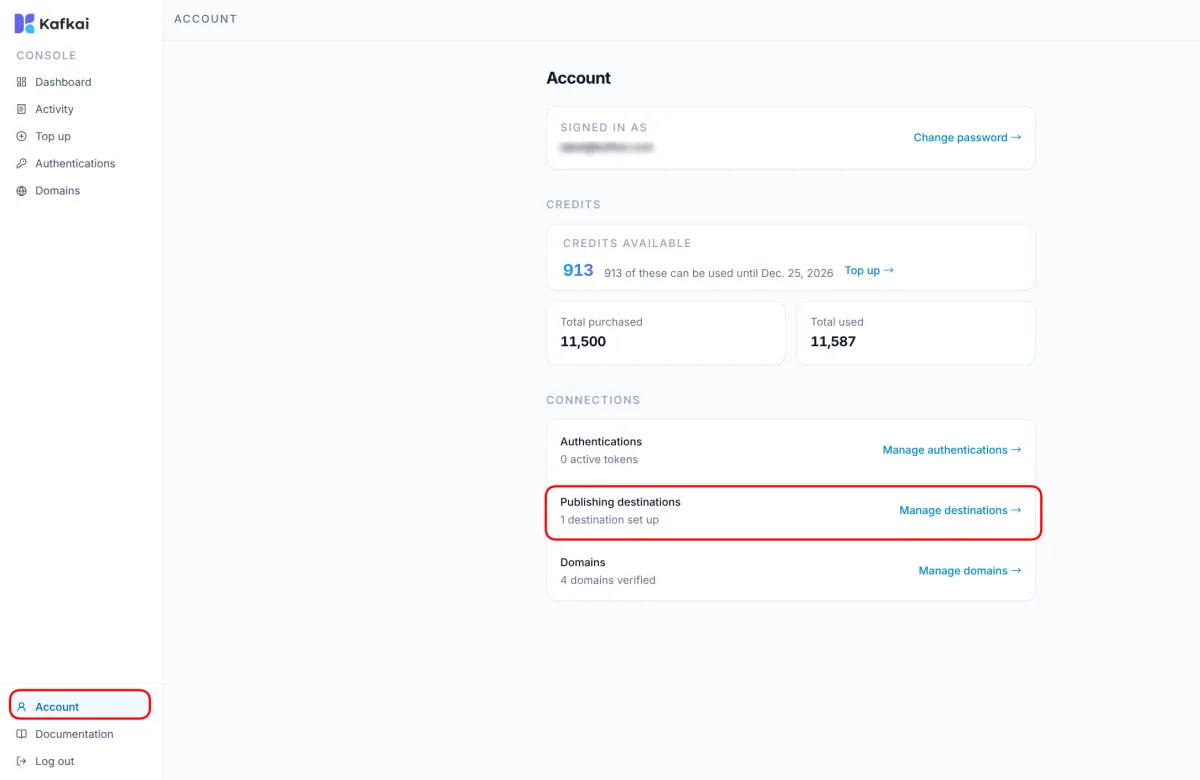 ## 2. Add a destination
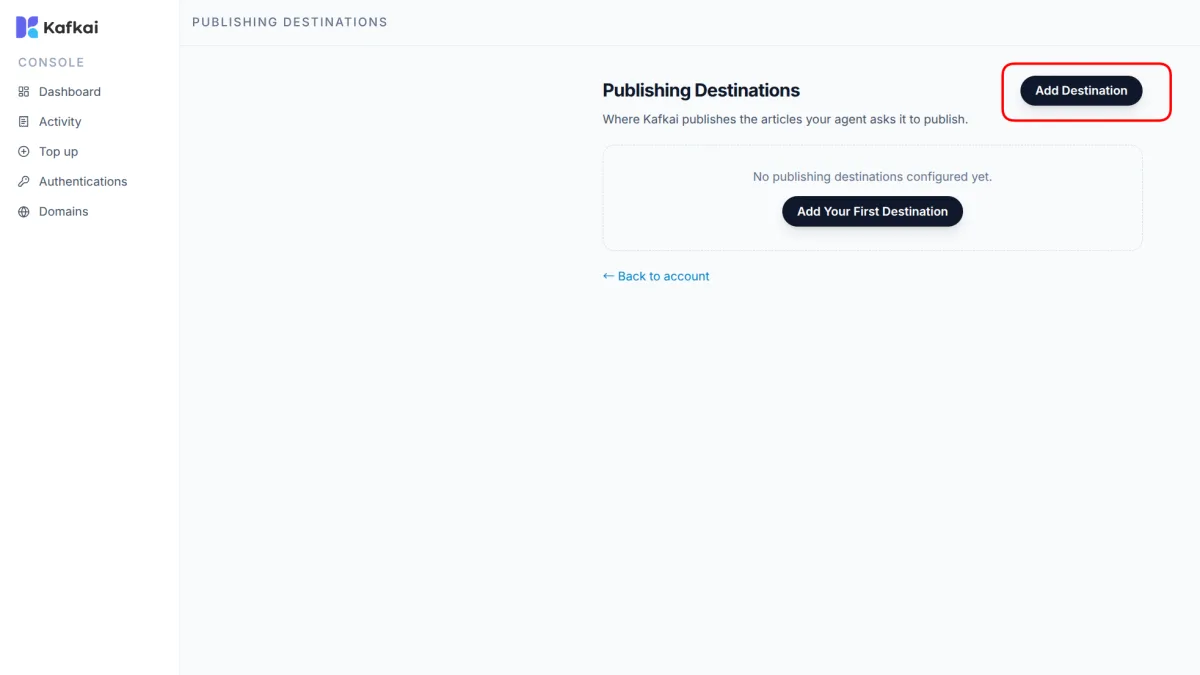
Choose **Add Destination**.
 ## 3. Enter the endpoint details
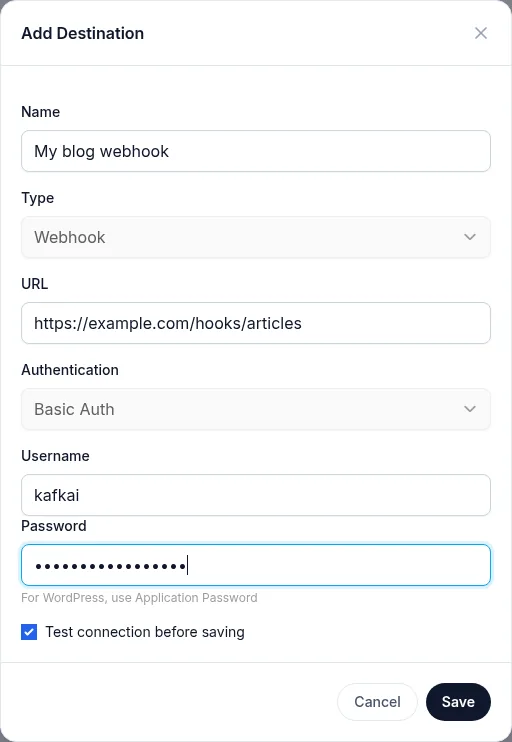
Fill in the form:
| Field | What to enter |
| --- | --- |
| **Name** | A label for the destination, such as `My blog webhook`. Your agent sees this name when it lists the destinations. |
| **Type** | **Webhook** |
| **URL** | The address of your endpoint, such as `https://example.com/hooks/articles`. |
| **Authentication** | **Basic Auth** |
| **Username** | The username that your endpoint expects. |
| **Password** | The password that your endpoint expects. |
Keep **Test connection before saving** selected, and choose **Save**.
 **Authentication** has one choice, **Basic Auth**, because it is the
only method Kafkai sends. This form requires a username and a password.
To reach an endpoint that needs no login, create the destination
without credentials through
`kafkai_add_publishing_destination`; Kafkai then sends no
`Authorization` header.
Kafkai stores the username and the password encrypted. Kafkai never
shows them again, and never returns them to your agent.
Enter these details on this page, not in a chat with your agent. That
way, the password never appears in a conversation.
## 4. Check that the destination is active
When the test passes, Kafkai saves the destination. The list shows it
with the **Active** label, the time of the last test, and a check mark.
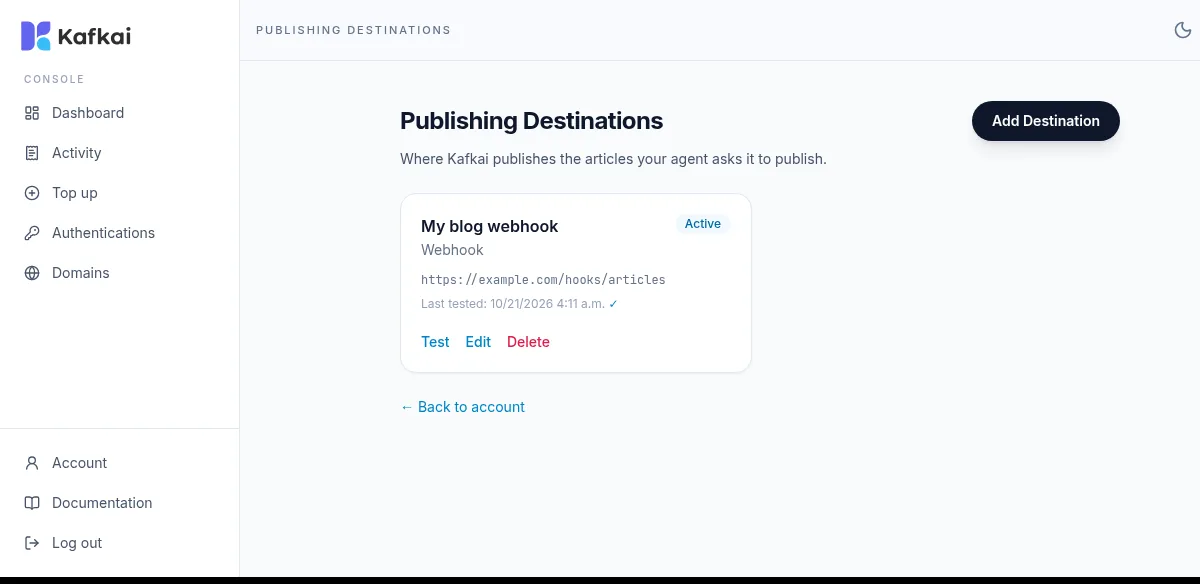 To run the test again at any time, choose **Test**.
The test confirms that Kafkai can reach the endpoint and that the
credentials are right. It does not publish an article, so a test that
passes is not a guarantee that publishing works. To confirm the whole
connection, publish one draft.
### How the test works
Kafkai sends a `GET` to the endpoint first. A `200` or `201` answer
passes. A `400` answer passes too, because it means the endpoint is
reachable and only objects to the payload. If the endpoint refuses the
`GET` with a `405`, Kafkai sends a `POST` with the body
`{"test": true}` instead. The test passes when that answer is `200`,
`201`, `202` or `400`.
An endpoint that answers `404` to a `GET` fails the test with
`Endpoint not found`, even when it accepts the article itself. If your
endpoint only serves `POST`, answer the `GET` with `405`.
## Publish a first draft
Ask your agent: "Write a short test article and publish it to my
webhook as a draft with Kafkai."
The agent calls `kafkai_list_publishing_destinations` to find the
destination, then `kafkai_publish_article` to send the text. Both are
free. The agent returns the ID that your endpoint gave, and the URL
when the endpoint returned one.
For the arguments of the publishing tools, see
[Publishing](https://kafkai.com/en/docs/tools/#publishing) in the tool reference.
## Update an existing post
Ask your agent to update the article, and to pass the `external_id`
that the first publish returned. Kafkai sends the same request to the
same URL with `external_id` in the body, so your endpoint updates that
post instead of creating a second one.
Keep the `external_id` of each language version separately. An article
in two languages is two posts, each with its own ID.
## If the connection test fails
The form shows `Connection test failed:` followed by the reason.
| Reason | What to check |
| --- | --- |
| `Invalid credentials` | The username or the password is wrong. Check what your endpoint expects. |
| `Access forbidden` | A firewall or a proxy blocks the request. Allow access to the endpoint. |
| `Endpoint not found - please check the webhook URL` | The URL is wrong, or the endpoint answers `404` to a `GET`. If the endpoint only serves `POST`, answer the `GET` with `405`. |
| `Webhook returned HTTP 500` | The endpoint answered with an error. Check its own logs. |
| `Cannot connect to webhook` | The URL has a typing error, or the endpoint is not reachable from the internet. |
| `Connection timeout` | The endpoint did not answer in time. Try again. |
If the username and the password are right and the reason is still
`Invalid credentials`, the server may remove the login details from the
request before your endpoint reads them. Ask your hosting provider
whether the server passes the `Authorization` header through.
## If the test passes but publishing fails
`kafkai_publish_article` returns the reason that your endpoint gave.
- **The endpoint answered with an error status.** Kafkai shows the
`error` or `message` field of a JSON error body. When the body is not
JSON, Kafkai reports the status code instead.
- **The endpoint answered with a success status and a body that is not
JSON.** A success status must come with a JSON body. An HTML body,
another content type, or a body that does not parse as JSON fails the
call, and Kafkai reports the first part of the body.
- **The endpoint answered with no ID.** A success status with a JSON
body that has neither `id` nor `external_id` fails the call. The
endpoint must return the ID of the post it created.
- **The request timed out.** Kafkai waits 30 seconds for the answer and
does not retry. A timeout or an error response fails the call.
For other errors, see [Troubleshooting](https://kafkai.com/en/docs/troubleshooting/).
## Remove the access
To stop Kafkai from publishing to the endpoint, remove the destination:
choose **Delete** on it in the
[Publishing Destinations page](https://kafkai.com/en/accounts/publishing-destinations/).
Articles that Kafkai already published stay where they are.
To keep the destination but pause publishing for a while, remove the
credentials on your endpoint instead. Kafkai then calls it without an
`Authorization` header, and your endpoint decides what to do with that.